Share Message with Location Template
Location Template
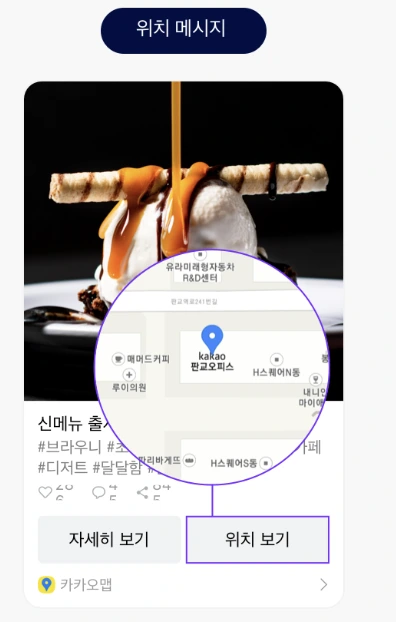
This message format includes location information. When the sender includes an address, the recipient can tap the location button to view place details on KakaoMap.
Use Case: Announce a new store opening or introduce a menu alongside location information.
Template Type Definition
/**
 * Message template that allows sharing a specific location using an address.
 *
 * @property address Address of the location to share. Example) 235 Pangyo Station-ro, Bundang-gu, Seongnam-si, Gyeonggi-do
 * @property addressTitle Title used in the map view within KakaoTalk. Example) Kakao Pangyo Office
 * @property content Content information describing the location
 * @property social Social information about the content, such as the number of comments and likes
 * @property buttons Button list. Used when you want to change the button title and the link, or when you want to use two buttons. (Up to 1 button, the view button on the right position is fixed)
 * @property buttonTitle Set to change the default button title "Learn more". If used, the link to move when the button is clicked will be the value entered in the content
 */
export interface KakaoLocationTemplate {
  address: string;
  content: KakaoTemplateContent;
  addressTitle?: string;
  social?: KakaoTemplateSocial;
  buttons?: KakaoTemplateButton[];
  buttonTitle?: string;
}
Usage
Use shareLocationTemplate to share a template message.
export function shareLocationTemplate(params: {
  template: KakaoLocationTemplate;
  useWebBrowserIfKakaoTalkNotAvailable?: boolean;
  serverCallbackArgs?: Record<string, string>;
  pickerSettings?: KakaoSharePickerSettings;
})
-
template: The template object. -
useWebBrowserIfKakaoTalkNotAvailable: Specifies whether to use a web browser for sharing when KakaoTalk is not available. The default value istrue. -
serverCallbackArgs: Server callback arguments. Each value must be passed as a string. -
pickerSettings: Share target selection settings.
info
Refer to Component Types for detailed component types.
If you encounter any issues, refer to Troubleshooting.