Share Message with Feed Template
Feed Template
This basic message format contains images and text. It can include a list of items.
Scrap messages also use the feed template structure.
A scrap message is built from Open Graph Protocol information retrieved from the requested web page URL.
Use Case: Share service news or promotional events. A scrap message makes it easy to share a web page. Use the item area to create feed messages such as order details, catalogs, and receipts.
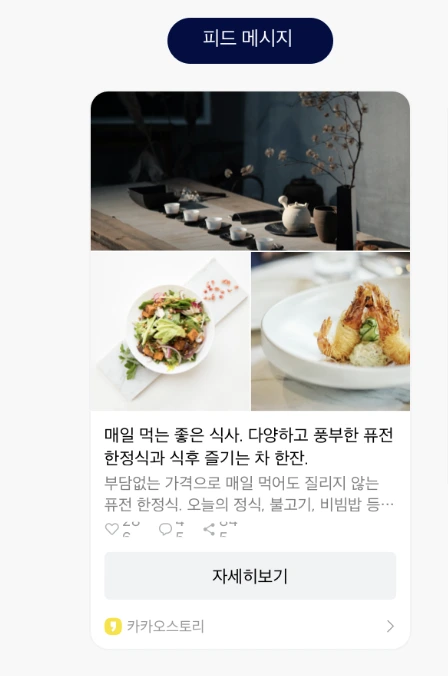
Template Type Definition
/**
 * Feed template class provided as a basic template.
 *
 * @property content Main content information of the message
 * @property itemContent Content to include in the item area, refer to [ItemContent]
 * @property social Social information about the content
 * @property buttons Button list, up to 2 buttons. Used when you want to change the button title and the link, or when you want to use two buttons
 * @property buttonTitle Set to change the default button title "Learn more". If used, the link to move when the button is clicked will be the value entered in the content
 */
export interface KakaoFeedTemplate {
  content: KakaoTemplateContent;
  itemContent?: KakaoTemplateItemContent;
  social?: KakaoTemplateSocial;
  buttons?: KakaoTemplateButton[];
  buttonTitle?: string;
}
Usage
Use shareFeedTemplate to share a template message.
export function shareFeedTemplate(params: {
  template: KakaoFeedTemplate;
  useWebBrowserIfKakaoTalkNotAvailable?: boolean;
  serverCallbackArgs?: Record<string, string>;
  pickerSettings?: KakaoSharePickerSettings;
})
-
template: The template object. -
useWebBrowserIfKakaoTalkNotAvailable: Specifies whether to use a web browser for sharing when KakaoTalk is not available. The default value istrue. -
serverCallbackArgs: Server callback arguments. Each value must be passed as a string. -
pickerSettings: Share target selection settings.
Refer to Component Types for detailed component types.
If you encounter any issues, refer to Troubleshooting.