Send Message with List Template
List Template
This message format displays content in a vertical list. Each list can contain images and text.
Use Case: Tell users about several updates or products in one message.
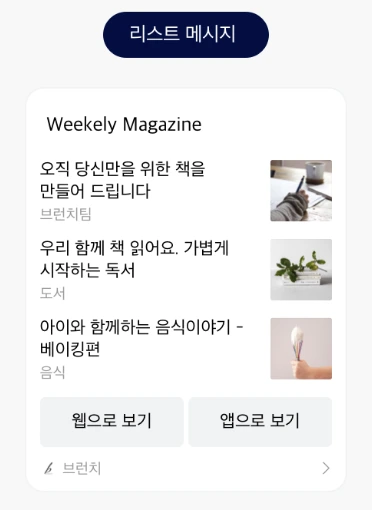
Template Type Definition
/**
 * Message template class that can display multiple contents in a list format.
 *
 * @property headerTitle Header title displayed at the top of the list (up to 200 characters)
 * @property headerLink Link information corresponding to the header title content
 * @property contents List of contents displayed in the list (minimum 2, maximum 3)
 * @property buttons Button list. Used when you want to change the button title and the link, or when you want to use two buttons (up to 2 buttons)
 * @property buttonTitle Set to change the default button title "Learn more". If used, the link to move when the button is clicked will be the value entered in the content
 */
export interface KakaoListTemplate {
  headerTitle: string;
  headerLink: KakaoTemplateLink;
  contents: KakaoTemplateContent[];
  buttons?: KakaoTemplateButton[];
  buttonTitle?: string;
}
Send Message to Myself
Use sendListTemplateToMe to send a template message to yourself.
export function sendListTemplateToMe(params: {
  template: KakaoListTemplate;
})
template: The template object.
Send Message to Friends
Use sendListTemplateToFriends to send a template message to your friends.
export function sendListTemplateToFriends(params: {
  template: KakaoListTemplate;
  receiverUuids: string[];
  includeFailureInfo?: boolean;
})
template: The template object.receiverUuids: List of friend uuids to send the message to. You can obtain these from the social package's Select KakaoTalk Friends or Get KakaoTalk Friends.
Pass includeFailureInfo: true to receive successful UUIDs and failures grouped by error. Omit it to receive the successful UUID array. See message results.
info
Refer to Component Types for detailed component types.
If you encounter any issues, refer to Troubleshooting.