Send Message with Calendar Template
Calendar Template
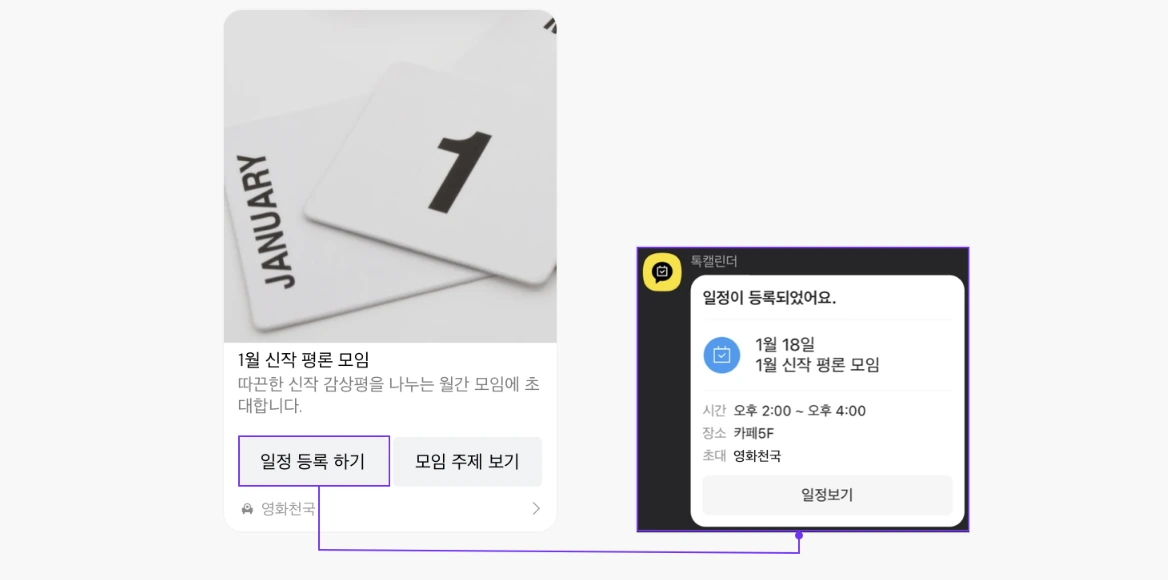
This message format includes public schedule or subscription calendar information from Kakao Calendar. Users can add a Kakao Talk Channel's public schedule or subscription calendar to their Kakao Calendar. Messages can only be sent for the public schedule or subscription calendar of the Kakao Talk Channel connected to the service app.
Use Case: Encourage users through Kakao Talk messages to add a service's public schedule to their calendar or subscribe to its calendar.
Template Type Definition
/**
 * Message format including subscription calendar or public schedule information from Kakao Calendar.
 * It provides the functionality to add the subscription calendar or public schedule of a Kakao Talk Channel to the user's Kakao Calendar.
 *
 * @property id ID of the subscription calendar or public schedule
 * @property idType Type of the ID, either event (public schedule) or calendar (subscription calendar)
 * @property content Content information describing the schedule
 * @property buttons Button list. When you want to change the link besides the title of the default button. (Up to 1 button, the view button on the right position is fixed)
 */
export interface KakaoCalendarTemplate {
  id: string;
  idType: 'event' | 'calendar';
  content: KakaoTemplateContent;
  buttons?: KakaoTemplateButton[];
}
Send Message to Myself
Use sendCalendarTemplateToMe to send a template message to yourself.
export function sendCalendarTemplateToMe(params: {
  template: KakaoCalendarTemplate;
})
template: The template object.
Send Message to Friends
Use sendCalendarTemplateToFriends to send a template message to your friends.
export function sendCalendarTemplateToFriends(params: {
  template: KakaoCalendarTemplate;
  receiverUuids: string[];
  includeFailureInfo?: boolean;
})
template: The template object.receiverUuids: List of friend uuids to send the message to. You can obtain these from the social package's Select KakaoTalk Friends or Get KakaoTalk Friends.
Pass includeFailureInfo: true to receive successful UUIDs and failures grouped by error. Omit it to receive the successful UUID array. See message results.
Refer to Component Types for detailed component types.
If you encounter any issues, refer to Troubleshooting.