Kakao Login (Web)
Web login requires extra steps because it redirects the user to another page using a redirect URI.
Supported web APIs use the same response fields and types as native. loginWithKakao and refreshToken are not supported on web.
setAccessTokenWeb and issueAccessTokenWithCodeWeb are web-only functions. On Android and iOS, setAccessTokenWeb throws synchronously and issueAccessTokenWithCodeWeb rejects its Promise with Package-UnsupportedPlatform. Use login or loginWithKakao for native login; the native SDK stores the tokens.
Logging In
Use Kakao Login to register users, log in, request additional consent, and obtain agreement to service terms.
Adding Redirect URI in Kakao Console
Add a Redirect URI in the Kakao Login section of the Kakao Console.
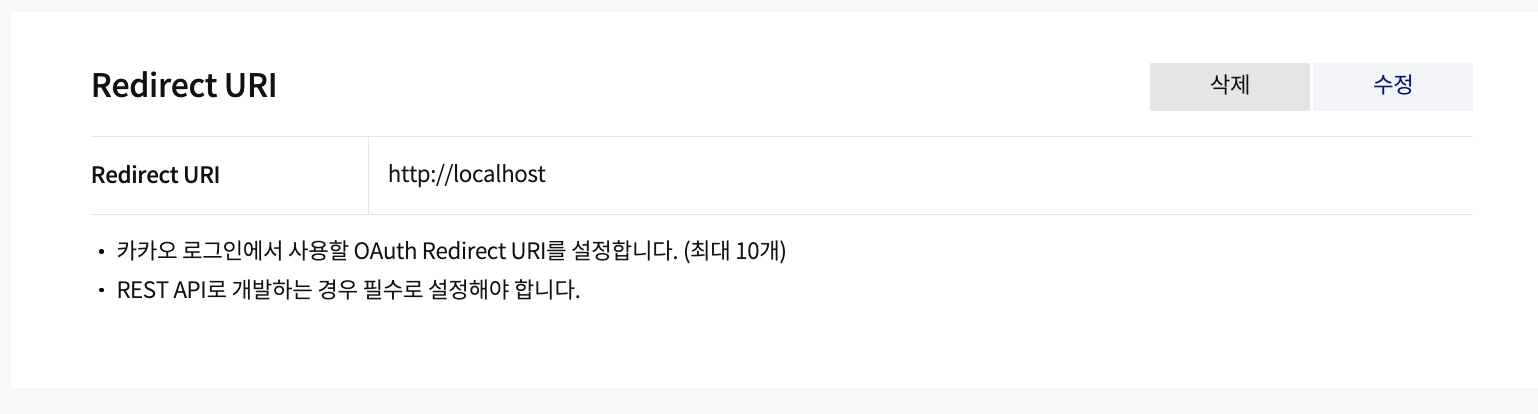
The example uses port 80 in a development environment. You should register the required Redirect URI for both development and release environments.
const { code } = useGlobalSearchParams<{ code?: string }>();
const accessTokenIssued = useRef(false);
useEffect(() => {
  const go = async () => {
    const { accessToken } = await issueAccessTokenWithCodeWeb({
      code: code!,
      redirectUri: 'http://localhost',
    });
    setAccessTokenWeb(accessToken);
    accessTokenIssued.current = true;
  };

  if (code && !accessTokenIssued.current) {
    go();
  }
}, [code]);
Step 1: Retrieve Authorization Code via Search Parameter from the Redirected Page after Simple Login
Calling the login() function redirects the user to the Kakao login page.
On the web platform, you must pass the web object.
Common scopes, serviceTerms, prompts, and nonce options are forwarded on web. SelectAccount maps to select_account; useKakaoAccountLogin: true disables login through KakaoTalk unless web.throughTalk overrides it.
loginHint prefills the ID field on the Kakao Account login screen. The common loginHint takes precedence over web.loginHint.
web.scope, web.serviceTerms, and web.prompt take precedence over their common equivalents. The common nonce takes precedence over web.nonce.
import { login } from '@react-native-kakao/user';

...

login({
  web: {
    redirectUri: 'http://localhost',
    prompt: ['select_account'],
  },
})
The redirectUri registered in the console must match the values used when calling login and issueAccessTokenWithCodeWeb for login to work.
Refer to the Official Documentation for detailed information on the parameters.
Step 2: Issue Access Token with Authorization Code
Use issueAccessTokenWithCodeWeb() to exchange the authorization code for an Access Token.
Once you have the Access Token, pass it to the setAccessTokenWeb() function.
The example below completes login in Expo Router using code from the search parameter.
const { code } = useGlobalSearchParams<{ code?: string }>();
const accessTokenIssued = useRef(false);
useEffect(() => {
  const go = async () => {
    const { accessToken } = await issueAccessTokenWithCodeWeb({
      code: code!,
      redirectUri: 'http://localhost',
    });
    setAccessTokenWeb(accessToken);
    accessTokenIssued.current = true;
  };

  if (code && !accessTokenIssued.current) {
    go();
  }
}, [code]);
This code is an example. You must retrieve code from the search parameter, then call issueAccessTokenWithCodeWeb and setAccessTokenWeb in that order.
Refer to the Official Documentation for detailed information on the parameters.
Response
The API returns token information in a Promise.
The response includes the following:
{
  tokenType: string;
  accessToken: string;
  idToken?: string;
  expiresIn: number; // unix
  refreshToken: string;
  refreshTokenExpiresIn: number; // unix
  scope?: string;
};